Right now, one thingŞu an, tek şey
One taskat a time. Bir seferdetek görev.
SelfPatch builds your day from the time you can give it, then quiets everything else and puts just one task in front of you. SelfPatch gününü ayırabildiğin süre kadar kurar, sonra her şeyi susturup önüne yalnızca birini koyar.
Google sign-in, 30 seconds. Free, no ads. Google ile 30 saniye. Ücretsiz, reklamsız.
Accelerated preview.Önizleme hızlandırılmıştır.
What it doesNe yapıyor
What the app does
Uygulama ne yapıyor?
SelfPatch is a free self-improvement app. You choose the areas of life you care about and answer three short questions; it picks realistic daily tasks for the time you have, one at a time, and says why it picked each one. SelfPatch ücretsiz bir kişisel gelişim uygulaması. Önemsediğin alanları seçer, üç kısa soruyu yanıtlarsın; elindeki vakte uyan gerçekçi günlük görevleri tek tek seçer ve her birini neden seçtiğini söyler.
The pool grows every week and is tuned by user feedback, so these are today’s counts, not a ceiling. Havuz her hafta büyüyor, geri bildirimlerle iyileşiyor; bunlar bugünün sayıları, tavan değil. snapshot
- NutritionBeslenmeLevel 11. seviye Weekly weight entry, pinnedHaftalık kilo girişi, sabit 3 pathsyol · 184 tasksgörev
- LearningEğitimLevel 11. seviye Explain a concept in your own wordsBir kavramı kendi kelimelerinle anlat 4 pathsyol · 188 tasksgörev
- FitnessSporLevel 11. seviye Zone 2 base sessionZon 2 taban seansı 3 pathsyol · 154 tasksgörev
- SleepUykuLevel 11. seviye Lights out at a fixed hourSabit saatte ışıkları kapat 3 pathsyol · 165 tasksgörev
- Mind & BreathZihin & NefesLevel 11. seviye Box breathing (4-4-4-4)Kutu nefes (4-4-4-4) 3 pathsyol · 148 tasksgörev
- ProductivityÜretkenlikLevel 33. seviye Review the month and set one goalAyı gözden geçir, tek hedef koy 3 pathsyol · 150 tasksgörev
- CultureKültürLevel 55. seviye Steelman an opposing viewKarşıt bir görüşü en güçlü hâliyle savun 3 pathsyol · 143 tasksgörev
- ExplorerKeşifLevel 55. seviye Visit somewhere you have never beenHiç gitmediğin bir yere git 3 pathsyol · 143 tasksgörev
RewardÖdül
Tasks earn XP and coins.Görevler XP ve coin kazandırır.
XP levels you up: the first level is 100 XP and the curve rises gently from there. Coins have more than one use inside the app. XP seni seviye atlatır: ilk seviye 100 XP, eğri oradan yavaşça yükselir. Coin’in uygulama içinde birden fazla kullanımı var.
RhythmRitim
Daily, weekly, monthly, and your own list.Günlük, haftalık, aylık ve kendi listen.
Daily tasks refresh every morning, weekly ones open on Monday, monthly ones come once. Your own list sits beside them on your device. Günlükler her sabah tazelenir, haftalıklar pazartesi açılır, aylıklar bir kez gelir. Kendi listen yanlarında, cihazında durur.
Anatomy of a taskGörevin anatomisi
Every task has a reason.Her görevin bir nedeni var.
1277 tasks in 8 modules today, and the pool keeps growing. Each rests on research or a known method and tells you why. Open one. Bugün 8 modülde 1277 görev, havuz büyümeye devam ediyor. Her biri bir araştırmaya ya da yönteme dayanır ve sana nedenini söyler. Birini aç.
FITNESS · CARDIO · MEDIUM · DAILYSPOR · KARDİYO · ORTA · GÜNLÜK
Zone 2 base sessionZon 2 taban seansı
Why?Neden?
Build your aerobic base with a steady Zone 2 effort: about 60–70% of max heart rate, an easy, nasal-breathing pace. Endurance research is clear that the bulk of training should be easy. It improves mitochondrial density and fat use, raising your ceiling for harder work. Aerobik tabanını sabit bir Zon 2 eforuyla geliştir: maksimum kalp hızının yaklaşık %60–70’i, burundan nefes alabildiğin kolay bir tempo. Dayanıklılık araştırmaları net: antrenmanın çoğu kolay olmalı. Mitokondriyal yoğunluğu ve yağ kullanımını artırır, daha zorlu çalışma için tavanını yükseltir.
- TargetHedef
- 35 minutes35 dakikaAdaptive: 20–75 min, in 5-min stepsAdaptif: 20–75 dk, 5’er dk
- TypeTür
- TimerZamanlayıcıRuns in focus modeOdak modunda akar
- RewardÖdül
- XP + 3 coinsXP + 3 coinCounts toward your streakSeriye de yazılır
- OpensNe zaman açılır
- Cardio path, week 3Kardiyo yolu, 3. haftaThe base comes firstÖnce taban kurulur
If you can’t, a shorter oneYapamazsan, daha kısasıEasy-pace cardio (conversational) · 25 minKolay tempo kardiyo (sohbet edebilir) · 25 dk
LEARNING · MEDIUM · DAILYEĞİTİM · ORTA · GÜNLÜK
Explain a concept in your own wordsBir kavramı kendi kelimelerinle anlat
Why?Neden?
The Feynman technique: pick a concept you “know” and explain it simply, out loud or in writing, as if teaching a beginner. The points where you stumble show exactly what you do not truly understand. Then go back and fill those gaps. Feynman tekniği: “bildiğin” bir kavram seç ve onu yeni başlayan birine öğretiyormuş gibi, sesli ya da yazılı, basitçe anlat. Takıldığın noktalar gerçekte neyi anlamadığını tam olarak gösterir. Sonra geri dön ve o boşlukları doldur.
- TargetHedef
- 1 concept1 kavramOut loud or in writingSesli ya da yazılı
- TypeTür
- One tapTek dokunuşMark it when doneYaptığında işaretle
- RewardÖdül
- XP + 3 coinsXP + 3 coinCounts toward your streakSeriye de yazılır
- OpensNe zaman açılır
- Path, week 5Yolun 5. haftasıLearning is open from level 1Eğitim 1. seviyeden açık
If you can’t, a shorter oneYapamazsan, daha kısasıCapture one note or highlightBir not veya alıntı yakala
MIND & BREATH · EASY · DAILYZİHİN & NEFES · KOLAY · GÜNLÜK
Use a physiological sigh when tenseGerginken fizyolojik iç çekiş kullan
Why?Neden?
In a tense moment, take a comfortable inhale through the nose, add one small top-up inhale, then exhale slowly through the mouth. Try it one to three times. Some people find it useful as a brief reset. Return to normal breathing if you feel strain or dizziness. Gergin bir anda burundan rahat bir nefes al, kısa ve küçük bir ek nefes al, ardından ağızdan yavaşça ver. Bir ila üç kez dene. Bazı kişiler bunu kısa bir toparlanma işareti olarak yararlı bulur. Zorlama veya baş dönmesi olursa normal nefese dön.
- TargetHedef
- 1–3 rounds1–3 tekrarIn a real tense momentGerçek bir gergin anda
- TypeTür
- One tapTek dokunuşMark it when doneYaptığında işaretle
- RewardÖdül
- XP + 2 coinsXP + 2 coinCounts toward your streakSeriye de yazılır
- OpensNe zaman açılır
- Level 11. seviyeMind & Breath is openZihin & Nefes açık
If you can’t, a shorter oneYapamazsan, daha kısasıAlready the shortest: one breath.Zaten en kısası: bir nefes.
CULTURE · PHILOSOPHY · HARD · DAILYKÜLTÜR · FELSEFE · ZOR · GÜNLÜK
Steelman an opposing viewKarşıt bir görüşü en güçlü hâliyle savun
Why?Neden?
Take a position you disagree with and argue it as persuasively as you can: the steelman. It is the core skill of philosophy. Understanding the strongest version of the other side sharpens your own thinking and guards you against lazy, strawman reasoning. Katılmadığın bir görüşü al ve onu olabildiğince ikna edici biçimde savun (steelman). Felsefenin temel becerisidir: karşı tarafın en güçlü hâlini anlamak kendi düşünceni keskinleştirir ve seni çürütülmek için kurulmuş tembel akıl yürütmeye karşı korur.
- TargetHedef
- 1 view1 görüşWritten or spokenYazılı ya da sesli
- TypeTür
- One tapTek dokunuşMark it when doneYaptığında işaretle
- RewardÖdül
- XP + 5 coinsXP + 5 coinCounts toward your streakSeriye de yazılır
- OpensNe zaman açılır
- Level 55. seviyeOpens with CultureKültür modülüyle açılır
If you can’t, a shorter oneYapamazsan, daha kısasıConnect an idea to todayBir fikri bugünle ilişkilendir
Mentorship · optionalMentorluk · isteğe bağlı
A mentor writes
on your day in blue.Bir mentor,
gününe mavi yazar.
The app works fully without a mentor. If you want one, a mentor builds your week for you: tasks, training days, nutrition days. Uygulama mentorsuz da tam çalışır. İstersen bir mentor haftanı senin için kurar: görevler, antrenman ve beslenme günleri.
-
01
Find a mentorMentor bul
Browse mentors by area: what they specialise in and how they explain things. A profile is open before you decide. Alanına göre mentorları gez: uzmanlıkları ve anlatımları. Profil, karar vermeden önce açık.
- FitnessSpor
- NutritionBeslenme
- SleepUyku
- LearningEğitim
Your mentor writes only for the modules the mentorship covers.Mentorun yalnız mentorluğun kapsadığı modüller için yazar.
-
02
Choose a periodDönemini seç
Six lengths. The period is how long your mentor writes for that module. Altı uzunluk. Dönem, mentorunun o modül için ne kadar süre yazacağıdır.
Period lengthDönem süresi 1 day1 gün1 week1 hafta1 month1 ay3 months3 ay6 months6 ay1 year1 yıl For this long, your mentor writes that module’s tasks instead of the algorithm. The period ends with a report, and your mentor’s access ends with it. Bu süre boyunca o modülün görevlerini algoritma yerine mentorun yazar. Dönem bir raporla biter, mentorunun erişimi de onunla biter. -
03
Your week gets builtHaftan kurulur
Your mentor writes tasks, training days and nutrition days. They arrive on Today in blue, with their source written on them. Mentorun görev, antrenman ve beslenme günü yazar. Bugün ekranına mavi, kaynağı yazılı gelir.
- MonPzt
- TueSal
- WedÇar
- ThuPer
- FriCum
- SatCmt
- SunPaz
- 1 Pomodoro session1 Pomodoro seansı FROM YOUR MENTOR · MONMENTORUNDAN · PZT
- Deep work 45 min45 dk derin çalışma FROM YOUR MENTOR · WEDMENTORUNDAN · ÇAR
- Daily review ritualGünlük gözden geçirme ritüeli FROM YOUR MENTOR · FRIMENTORUNDAN · CUM
-
04
You stay in controlKontrol sende
Your mentor sees only what you open. Everything starts closed. Mentorun yalnızca açtığın alanları görür. Hepsi kapalı başlar.
Preview: these switches do not change any account.Önizleme: bu anahtarlar hiçbir hesabı değiştirmez.
The 72-hour rule72 saat kuralıIf your mentor stays silent for 72 hours, the period closes on its own and the unused days come back to you. Mentorun 72 saat sessiz kalırsa dönem kendiliğinden kapanır; kullanmadığın günler sana geri döner.
What a mentor can seeMentor ne görebilir
Always on: the status of the tasks your mentor assigned you. That is the service working, not a consent item. The twelve items beside it start closed, and every one is yours to open and close again. Her zaman açık: mentorun sana atadığı görevlerin durumu. Bu bir rıza kalemi değil, hizmetin işleyişi. Yanındaki on iki kalem kapalı başlar; her birini sen açar, sen kapatırsın.
Every look is logged, and you can read the log. Access ends with the period. Her bakış kayda geçer, kaydı okuyabilirsin. Erişim dönemle biter.
- ReviewOnayBy hand, per moduleElle, modül bazında
- HealthSağlıkHabit support only: no diagnosis, no treatment, no doses, no harmful targetsYalnız alışkanlık desteği: teşhis, tedavi, doz ve zararlı hedef yok
- ContactİletişimNo phone, e-mail, social or payment details, either wayTelefon, e-posta, sosyal hesap, ödeme bilgisi yok; iki yönde de
- ModerationModerasyonWhat a mentor writes is user content, and is moderatedMentorun yazdığı kullanıcı içeriğidir, moderasyona tabidir
Closed until you open themSen açana kadar kapalı
How long records are kept, in daysKayıtların saklandığı süre, gün
- 30application documents, after reviewbaşvuru belgeleri, incelemeden sonra
- 90form answers and check-in text, after mentorship endsform cevapları ve check-in metni, mentorluk bittikten sonra
- 365the access logerişim kaydı
- 730moderation evidencemoderasyon delili
- 1095consent proofrıza kanıtı
The breakMola
Between tasks,
a one-minute game.Görev arası,
bir dakikalık oyun.
Guess a plate’s calories, a work’s year, an activity’s burn, or the day’s word. And every day, one question. Tabağın kalorisini, bir eserin yılını, bir antrenmanın yakımını ya da günün kelimesini tahmin et. Her gün bir de soru.
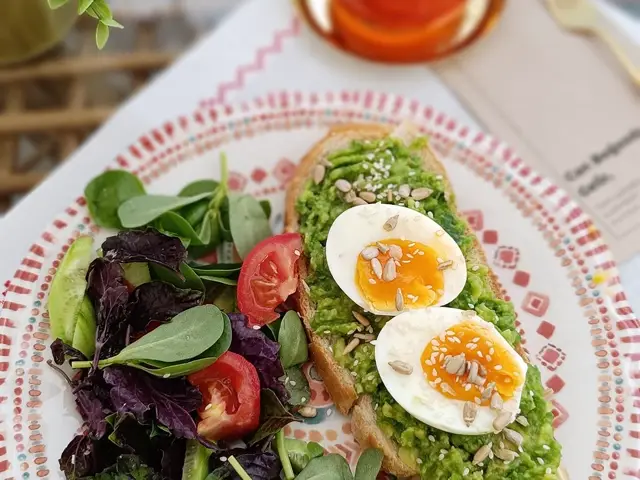
CALORIE GUESS · PUZZLE #8KALORİ TAHMİNİ · BULMACA #8
Avocado toast with eggYumurtalı avokadolu tost
- Bread (1 thick slice)Ekmek (1 büyük dilim)60 g
- Mashed avocadoAvokado ezmesi80 g
- Boiled egg (1)Haşlanmış yumurta (1 adet)50 g
- Green side saladYeşillik salata60 g
This plate is 380 kcal. In the app, a guess within ±10% counts as right.Bu tabak 380 kcal. Uygulamada ±%10 içinde tutarsan doğru sayılır.
In the app the answer stays on the server until you have guessed, you get one attempt a day, and macros are scored too. Uygulamada cevap sen tahmin edene kadar sunucuda kalıyor, günde bir hakkın oluyor ve makrolar da puanlanıyor.
Question of the dayGünün sorusu
Being nagged by app notifications:Uygulama bildirimleriyle çalışmaya zorlanmak:
This page does not count votes. In the app you see how the split came out, and a new question arrives every day. Bu sayfa oy saymaz. Uygulamada dağılımın nasıl çıktığını görürsün; her gün yeni bir soru gelir.
No right answer, nothing scored, new at midnight. Doğrusu yok, puan yok, gece yarısı değişir.
- 204plates to guesskalori bulmacası
- 129works to dateyıl tahmini
- 60activities to burnyakım tahmini
- 200+200words, Turkish + Englishkelime, Türkçe + İngilizce
- 2228questions in 26 pools, plus 362 quotes26 havuzda soru, yanında 362 söz
Today’s counts. New puzzles and questions keep arriving. Bugünün sayıları. Yeni bulmacalar ve sorular gelmeye devam ediyor.
Your dataVerin
What Google account data SelfPatch uses
SelfPatch Google hesabından hangi veriyi kullanıyor
Sign-in is Google only, and asks for the basic OpenID scopes and nothing else — openid, email, profile: your email address, name and profile picture. They create your account, keep your progress attached to it, and show your name and avatar in the app. SelfPatch never posts to your Google account, never reads Gmail, Drive, Calendar or Contacts, and never sells your data or shares it for advertising. Service providers process data to run SelfPatch, and you control optional mentor sharing. Delete your account from Settings at any time. Full detail in the Privacy Policy. Giriş yalnızca Google ile ve yalnızca temel OpenID kapsamlarını ister — openid, email, profile: e-posta adresin, adın, profil fotoğrafın. Hesabını oluşturur, ilerlemeni ona bağlar, uygulamada adınla avatarını gösterir. SelfPatch Google hesabına hiçbir şey göndermez; Gmail, Drive, Takvim veya Kişiler'ini okumaz; verini satmaz veya reklam amacıyla paylaşmaz. Hizmet sağlayıcılar SelfPatch'i çalıştırmak için veriyi işler; isteğe bağlı mentor paylaşımını sen yönetirsin. Hesabını istediğin an Ayarlar'dan silersin. Ayrıntının tamamı Gizlilik Politikası'nda.
- Sign-inGirişGoogle only. No password, no magic link.Yalnızca Google ile. Şifre yok, sihirli bağlantı yok.
- Google dataGoogle verisiName, email and profile picture, to recognise your account. No contacts, files or calendar.Adın, e-postan ve profil görselin; hesabını tanımak için. Kişiler, dosyalar, takvim yok.
- PlatformPlatformWeb today, Android in testing. No iOS build yet.Bugün web, Android testte. iOS henüz yok.
- PriceÜcretFree, with no ads.Ücretsiz, reklamsız.
QuestionsSorular
Asked before you ask.Sormadan önce sorulanlar.
What is SelfPatch?
A free self-improvement app that decides what you should do today. You pick the areas of life you care about, answer three questions, and it assigns a small set of daily tasks from a pool of over a thousand, sized to the time you have. Completing them earns XP and levels.
How does SelfPatch choose my tasks?
From what you told it and from what you have actually been doing. Your onboarding answers become a personality vector the pool is matched against, and the daily minutes you committed weigh in: a task longer than your time is less likely, not ruled out. Opening a task shows why it was picked, so the choice is never a black box.
Which platforms does SelfPatch run on?
The web app runs in any modern browser and is what the button on this page opens. Android is in Play internal testing: leave your Google account address below and an invite goes out with the next build. There is no iOS build yet.
Is SelfPatch free?
Yes, and there are no ads and nothing to buy. It is a beta built by one person; if that ever changes it will be said plainly here first.
What Google account data does SelfPatch use?
Signing in with Google is the only way in. It requests the basic OpenID scopes only, openid, email and profile, which give SelfPatch your email address, name and profile picture. Those create your account, keep your progress attached to it, and show your name and avatar in the app. SelfPatch never posts to your Google account and never reads Gmail, Drive, Calendar or Contacts.
What are the games and the digital twin?
Four daily games sit alongside the tasks: guessing the calories on a plate, dating a painting or a building, a word puzzle in Turkish or English, and estimating what an activity burns. The twin is a figure that changes through sixteen visual stages as you progress, with thirty-six cosmetic items, five sets and six palettes earned by playing rather than bought.
SelfPatch nedir?
Bugün ne yapman gerektiğine karar veren, ücretsiz bir kişisel gelişim uygulaması. Önemsediğin alanları seçiyorsun, üç soru yanıtlıyorsun; binden fazla görevlik havuzdan, elindeki vakte göre ölçülmüş küçük bir günlük set atanıyor. Tamamladıkça XP kazanıp seviye atlıyorsun.
Görevlerimi nasıl seçiyor?
Hem söylediklerinden hem de gerçekten yaptıklarından. Tanışma cevapların, havuzun eşleştirildiği bir kişilik vektörüne dönüşüyor; taahhüt ettiğin günlük dakika da hesaba giriyor: süresini aşan bir görev elenmiyor, yalnız daha az çıkıyor. Bir görevi açınca neden seçildiğini görüyorsun, yani seçim hiçbir zaman kapalı bir kutu değil.
Hangi platformlarda çalışıyor?
Web uygulaması her modern tarayıcıda çalışıyor; bu sayfadaki düğme onu açıyor. Android, Play iç testinde: aşağıya Google hesabı adresini bırak, bir sonraki sürümle davet gelsin. Henüz iOS sürümü yok.
Ücretsiz mi?
Evet; reklam da yok, satın alınacak bir şey de. Tek kişinin yaptığı bir beta. Bu bir gün değişirse, önce burada açıkça yazacak.
Google hesabımdan hangi verileri kullanıyor?
Girmenin tek yolu Google ile giriş. Yalnızca temel OpenID kapsamları isteniyor: openid, email ve profile — yani e-posta adresin, adın ve profil fotoğrafın. Bunlar hesabını oluşturmak, ilerlemeni hesabına bağlamak ve uygulamada adınla avatarını göstermek için. SelfPatch Google hesabına hiçbir şey göndermez; Gmail, Drive, Takvim veya Kişiler'i okumaz.
Oyunlar ve dijital ikiz ne?
Görevlerin yanında dört günlük oyun var: tabaktaki kaloriyi tahmin etme, bir tabloyu ya da yapıyı tarihlendirme, Türkçe veya İngilizce kelime bulmacası ve bir aktivitenin ne yaktığını kestirme. İkiz ise ilerledikçe on altı görsel kademeden geçen bir figür; otuz altı eşya, beş set ve altı palet satın alınarak değil oynanarak açılıyor.

Light yours.Işığını yak.
Google, 30 seconds. Three short questions, then your first task. Google ile 30 saniye. Üç kısa soru, sonra ilk görevin.
Google sign-in only. Opens in this tab.Yalnızca Google ile giriş. Bu sekmede açılır.
Android early accessAndroid erken erişim
Play internal testing opens only for addresses on the tester list. Leave your Google account address and the invite comes with the next build. This is an invite list, not a sign-in. Play iç testi yalnızca test listesindeki adreslere açılıyor. Google hesabı adresini bırak, davet bir sonraki sürümle gelsin. Bu bir davet listesi, giriş değil.
Only the address is stored, and only to send the invite.Yalnızca adres saklanıyor, yalnızca daveti göndermek için.